Move Outlook Contacts - Easily, Quickly and Satisfyingly
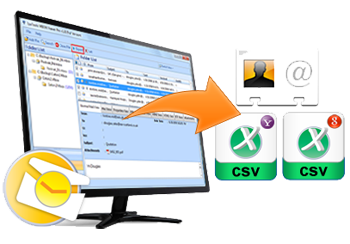
SysTools vCard Export software will help you move your Microsoft Outlook PST Contacts to VCF or WAB or Excel Export Outlook Contacts:With the help of SysTools vCard Export tool you can export MS Outlook contacts to the following formats:
- PST contacts to vCard VCF format
- PST contacts to XLS (Excel file format)
- PST to WAB contacts (Windows Address Book file format)
SysTools vCard Export - Export MS Outlook Contacts to vCard File
SysTools vCard Export tool to convert Outlook Contacts to vCard File. As it is an Outlook Address Book Conversion so that it also allows you to convert MS Outlook Contacts to Windows Address Book (WAB) & MS Excel file.
Benefits of Exporting PST Contacts of Outlook to vCard:
If you transfer Outlook contacts to vCard, then it can really prove beneficial for you at the time of switching email client from Microsoft Outlook (especially in the need of shifting all contacts to the newer platform). Following are some benefits that you will get after you Move Outlook contacts to VCF format:
- Most Email Clients Accept vCard Format: Many email clients like Lotus Notes, Outlook Express, etc can read and accept vCard VCF format. This Outlook Address Book conversion to vCard will prove beneficial at the time of switching email clients and when you need to transfer all your PST contacts to some email client other than Outlook.
- Many Devices Use vCard Format: vCards are also used and accepted by various devices like mobile phones, iPod, ACT, Palm etc. This vCard VCF format can be easily used with many digital devices and Operating Systems. So, if you are investing in an export vCard tool, it will really prove to be a profitable proposition for you.
Download and Try SysTools vCard Export tool for FREE to convert Outlook contacts to vCard, convert PST to WAB!
Demo Version (Know the Product before Buying):
File Size: 3.26 MB
Software Version: 4.0
OS Requirements: Win 2000/XP/2003/Vista/Windows 7
Just by a quick online download of the FREE Demo Version, you can easily and quickly see SysTools vCard Export software in front of your eyes on your computer screen. You can try our product FREE of cost! Using this working Demo of our software, you will be able to export 15 Outlook contacts. To move Outlook contacts completely i.e. to transfer all PST contacts, you would need to buy the Full Licensed Version of the software.
Feature Valley:
Following are some significant features of our unique tool:
- Export PST Contacts to VCF: Using SysTools vCard Export software, you can quickly export your Outlook PST contacts to vCard VCF format and avail the benefits of using vCards..
- Export PST to WAB Contacts: You can move Outlook contacts to Windows Address Book (WAB) file also using our software.
- Export PST Contacts to Excel: You can also convert Outlook contacts to Excel XLS file using our product.
- Export Contacts from ANSI & Unicode PST: You can move Outlook contacts both from ANSI PST (MS Outlook 2000/2002/XP format) and from Unicode PST (Outlook 2003/2007 format).
- Most Windows Versions Supported: Software supports Windows 98, Me, 2000, 2003, XP, Vista, and Windows 7.
Full Version (Convert All PST Contacts): . As per your need, you can either choose to buy a Personal License or a Business License for SysTools vCard Export software. Price of our product of is starting at ONLY $49. Using the Full Licensed Version of the software, you can convert ALL your Microsoft Outlook PST contacts easily, quickly and satisfyingly.


I used vCard Export for contacts conversion. It is really a master piece. I never expect that a tool can give accurate conversion result in just a few clicks – Juliate
Contact our Technical team to sort out any query regarding vCard Export. We are here to give you a great support service for 24X7.